
How to find the right spare parts
After years of repeated use, some refrigeration and commercial kitchen machines may need parts replaced. We've got over 800 spares and accessories available online and with such a varied range, including everything from spare castors to wire racks, it's not always easy finding the right part. This guide breaks it down for you so can find the right replacement in no time.
SHOP SPARES & ACCESSORIES NOWIdentify the Machine
It's always best to use the correct brand spare parts that are designed for your machine. First, you need to identify the machine by finding its make and model, then you'll be able to find the compatible parts.
- Model Number: Manufacturers can produce many different versions of appliances, with relatively minor changes between each one. The model number helps to identify the exact machine.
Model numbers can usually be found on the Identification Plate. This is a small metallic plate or sticker which provides much more detailed information about the product. - Brand: Most of the time, the brand of the machine should be obvious, as appliances usually feature a permanent brand badge or embossed logo on the front or top of the unit.
- Online Order History: If you bought the machine from Nisbets, you may be able to find the model and serial number through your order history on the Nisbets website. Log in and click “View Order History”. It helps to have a rough idea of when (month and year) the item was purchased.
- Serial Number: Often just abbreviated to “SN” or “Serial”, this is usually a long number which lets the manufacturer identify when and where the machine was made. The serial number is usually on the identification plate, although sometimes it can be found in the user manual, on the packaging or even stamped onto the machine itself.
- Manufacturer: Finally, if none of this information is available, try to find the machine online. You can check with the original retailer who sold the machine, or view the manufacturer’s website to narrow down which model it is. Don’t worry if it’s discontinued – many spare parts are still available years after a product is discontinued.
You'll normally find this information on the side, back or base of your unit. However in fridges and freezers the plate might be inside the unit. The identification plate usually looks similar to this example.

If you can't find an identification plate, you should be able to find the model number in the User Manual.
TIP: Use your Online Order History to check if your appliance is still under warranty.
Now you have the unit's brand and model number, you can find the machine using the Nisbets website. All you need to do is enter the model number into the search box at the top of the page and a full list of spares and accessories will be displayed, as well as the product itself.
You can also search for the appliance manually by going directly to the Spares and Accessories category. As long as you know the brand of the product, you can use the site navigation to narrow down your search criteria.
Identify the part
Now you can see the unit on the website, you'll need to identify the part next. There are some parts which might be a bit more complicated to describe but there are some, like a frying basket, that are much easier to pick out.
To find the right part, click on the Useful Documents tab found on the right of the "Product Information" tab on the product page. If you're using your mobile or tablet the Useful Documents tab is further down the page.
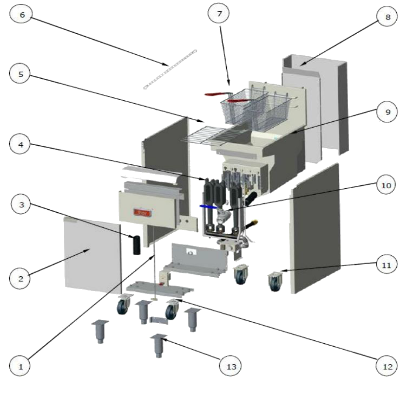
Then there's the option to download the Specification Sheet, the User Manual or the Exploded Diagram.
If you click on the Exploded Diagram you'll be able to identify the parts.
You’ll then see a full breakdown of the machine, as well as a chart below with codes and part descriptions.
Just cross-reference the part you need and enter the code into the website. If you see a telephone icon under the "code" please call for assistance, as the part may need to be installed by a specialist or may have an extended delivery time. Where multiple parts are covered under a single code, all those individual components are sold as a single “assembly” and not available singly.
TIP: Appliances are regularly updated. Remember to cross reference the Serial Number too. Product pages usually have compatibility information which includes suitable serial numbers.
How to Find Spare Parts - FAQs
Can Nisbets do repairs?
If the product is within warranty, call our Service team on 02 4648 7887 to log your warranty request.
If the product is out of warranty, we're able to repair a wide variety of machines at highly competitive prices. See our Warranties and Repairs Page for further details.
How do I know if I'm ordering the right part?
Just give us a call on 02 4648 7887 and we'll guide you through making the right decision. If you've already bought the spare part and find out it's not the right one, you'll be able to return it to us for a full refund assuming it's in an unused condition.
How can I urgently get spare parts?
Check out our Stores Page to see if your nearest store stocks the part you need. Then you can use the click and collect service to pick it up.